Penn State Wilkes-Barre
Report a Concern Give Now Campus Transition
  • Academics
    • Bachelor's Degree Programs
    • Associate Degree Programs
    • 2+2 Plan
    • Minors
    • Academic Services
  • Student Life
  • Tuition/Financial Aid
  • Information For
    • Current Students
    • Parents and Families
    • Alumni and Friends
    • Student Athletes
    • Veterans and Military
    • Working Professionals
    • Community
    • Faculty and Staff
Full site navigation menu

This dialog contains the full navigation menu for this site.

Penn State Wilkes-Barre
Enter the terms you wish to search for.
Search type:
Report a Concern Give Now Campus Transition
  • This is Penn State
    • Campus Advisory Board
    • Campus Leadership
    • Mission, Vision, and Values
    • Quick Facts
    • Diversity
    • Sustainability
    • LaunchBox
    • Strategic Communications
    • Contact Us
  • Tuition & Financial Aid
  • Academics
    • Associate Degrees
    • Bachelor’s Degrees
    • 2+2 Plan
    • Minors
  • Academic Services
    • Academic Affairs
    • Advising Center
    • Campus Bookstore
    • Career Services
    • Disability Services
    • Information Technology Services
    • Learning Center
    • Media Commons
    • Nesbitt Library
    • Registrar
  • Student Life
    • Student Affairs
    • Student Activities
    • Athletics
    • Food Bank
    • Food Services
    • Housing Options
    • Health and Wellness
    • Personal Counseling
    • Legal Services
    • Police and Public Safety

Find Information For:

  • Current Students
  • Parents and Families
  • Alumni and Friends
  • Student Athletes
  • Veterans and Military
  • Working Professionals
  • Community
  • Faculty and Staff

Helpful Links

  • * Transition Resources for Students
  • * Transition Resources for Faculty/Staff
  • Calendar of Events
  • Countdown to Cap and Gown
  • Campus Map
  • Directions
  • Directories
  • Nesbitt Library
  • Course Bulletin
  • Schedule of Courses
  • Inclement Weather
  • Police & Public Safety
  • PSU Alerts
  • Employment at Penn State

Connect With Us

  • instagram
  • facebook
  • youtube
  1. Home
  2. Information Technology Services
  3. Computer Labs & Classrooms

Authenticating in Zoom

Some Zoom rooms at Penn State have been set up to allow only Penn Staters to enter. Because of that, you will need to log into your Zoom desktop client using your Penn State AccessID (e.g., abc1234) and password before you join a Zoom meeting.

  1. If you haven’t already downloaded it, download the Zoom desktop client (launcher).
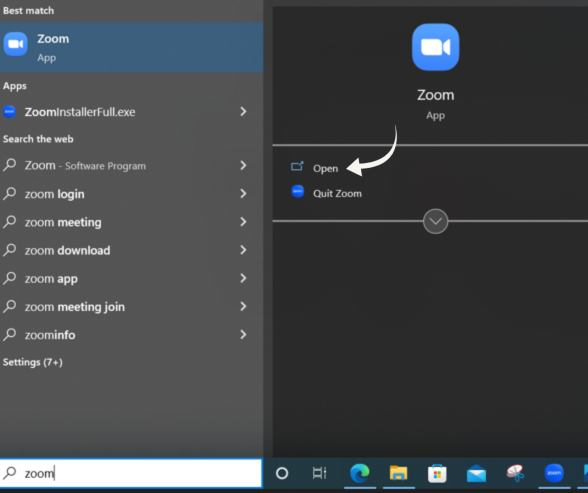
  2. Open the Zoom desktop client.
    Zoom Desktop Screen with "Open" tab on the right side
  3. Don‘t enter your email address and password in the window that appears; Instead, click Sign in with SSO. (SSO stands for "single sign on.")
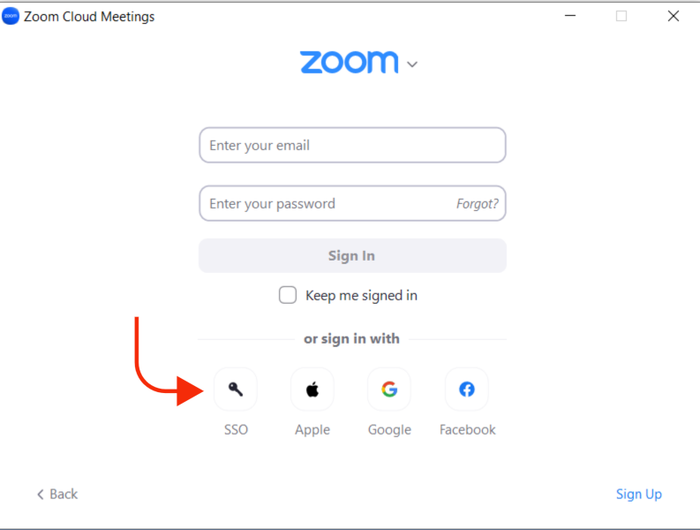
    The Zoom "Sign In" dialog box with the "Sign In with SSO" button down below
  4. Enter "psu" in the Company Domain field and click Continue.
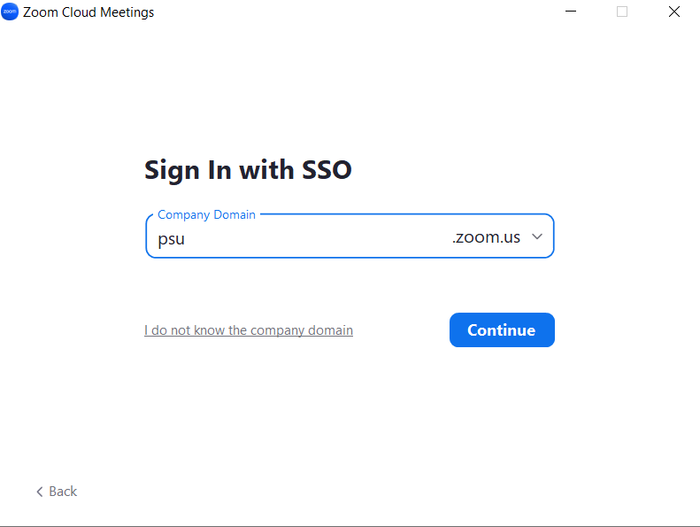
    The Zoom "Sign In" dialog box with "psu" typed in the "Company Domain" text box
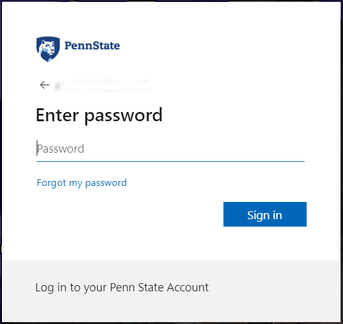
  5. Enter your Penn State email address ([email protected]) in the “Sign in” window and click Next. Then enter your password and click Sign in.
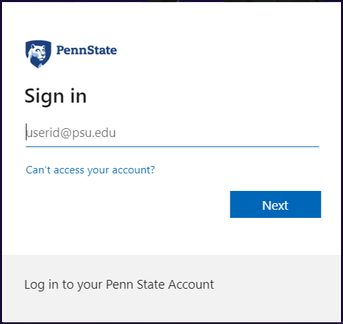
    The Zoom sign-in screen with a field for entering your Penn State email address
    The Zoom sign-in screen with password field
  1. You are now signed into your Penn State Zoom account. You can click a Zoom link to enter your meeting or webinar.

Note: If you cannot enter a Zoom meeting or webinar and receive the message “This meeting is for authorized attendees only,” click Sign in to Join and enter your Penn State AccessID.

For further information, read Zoom: How to Log In and Start a Meeting or Webinar.

Information Technology Services

  • Access Account Overview
  • Wireless Networking
  • Computer Labs & Classrooms
    • Computer Lab Hours
    • Computer Lab Software
    • Classroom Technology
    • Media Services
    • Videoconferencing
    • Authenticating in Zoom
  • Media Services
  • Penn State Disk Space
  • Email Auto-Response
  • MS Azure Development Tools for Teaching

Campus Information Technology Services

Campus Help Desk

Center for Technology 108
phone: (570) 675-9140
email: [email protected]
hours: Mon–Fri, 8 a.m.–5 p.m.

• Open a Help Ticket
• Submit Technology Request
• Ask a Question/Report a Problem

Meet Our Staff

U.P. Information Technology Services

University Service Desk

phone: (814) 865-HELP (4357)
email: [email protected]
web: itservicedesk.psu.edu
24/7 support: live chat
look it up: Knowledgebase

View Technology Alerts
Student Technology Guide
University Directory Lookup

University IT Website
Map of Pennsylvania showing Penn State’s 24 locations with Penn State Wilkes-Barre highlighted.

Penn State Wilkes‑Barre

Located on a scenic estate just 13 miles from Wilkes‑Barre, Penn State Wilkes‑Barre offers four‑year baccalaureate degree programs, two‑year associate degree programs, and a wide range of professional develop­ment oppor­tunities. Our small classes encourage close inter­action with professors who are committed to helping you be successful.
  • instagram
  • facebook
  • youtube
Give Now Campus Transition
  • This is Penn State
    • Campus Advisory Board
    • Campus Leadership
    • Mission/Vision/Values
    • Quick Facts
    • Campus History
    • Diversity
    • Sustainability
    • Strategic Communications
    • Contact Us
  • Current Students
  • Tuition & Financial Aid
  • Academics
  • Academic Services
  • Student Life
  • Athletics
  • Contact Us
  • Online Tools
    • Account Management
    • Canvas
    • Email (Office365)
    • ePortfolio
    • Kaltura
    • LionCash+
    • LionPATH
    • LinkedIn Learning
    • Sites
    • Starfish
    • TurnItIn
    • Voicemail
    • WorkLion
    • Zoom
  • Helpful Links
    • PSUAlerts
    • Blue Screen
    • Class Cancellations
    • Calendar of Events
    • Schedule of Courses
    • Nesbitt Library
    • Directions
    • Campus Map
    • Employment
  • In Case of Inclement Weather
  • Police & Public Safety
Penn State University
44 University Drive, Dallas, Pennsylvania 18612 (570) 675-2171

Footer Legal Menu

  • Privacy
  • Non-discrimination
  • Accessibility
  • Copyright
  • The Pennsylvania State University © 2026
  • We Are Penn State